Persona Management Feature
Redesigning an existing feature to balance customer documentation with product presentation.
At a glance

A widely used feature that Sales rarely showcased
Not demo-worthy
Although the feature was widely used, Sales rarely showcased it in product demos because it didn't communicate its value effectively.
A living document
Personas held long-form text and detailed customer research, with only a few visual elements throughout the profile.
The challenge was to improve the experience without changing the existing workflow, creating a cleaner, more flexible profile that supported both everyday documentation and compelling presentations.

The existing persona page used a three-column layout with various controls, but it was mostly made up of text boxes for persona background, needs, expectations, and more.
Four research activities, one focused scope
The redesign was driven by several complementary research activities, each helping us understand the problem from a different perspective.
- 01Sales feedback
- 02Customer survey
- 03Internal workshop
- Redesign
- 04Design partner validation
- Development
Sales feedback
Understand why the feature wasn't effective in demos.
Customer survey
Learn how customers create and maintain personas.
Internal workshop
Identify JTBD, pain points, and prioritize opportunities.
Design validation
Validate the redesign with customers before development.
-
01
Sales team
Sales feedback
The project began with feedback from our Sales team, who felt the existing Persona feature wasn't visually strong enough for product demonstrations. They wanted persona profiles that better showcased the platform's capabilities while remaining practical for customers.
-
02
Customers
Customer survey
We surveyed customers to understand how they created personas, what information they included, and how the feature supported their daily work. The survey showed that most teams treated personas as living documents, relying heavily on detailed text and only occasionally using images or other visual elements.
-
03
Product · Sales · Customer Success
Cross-functional workshop
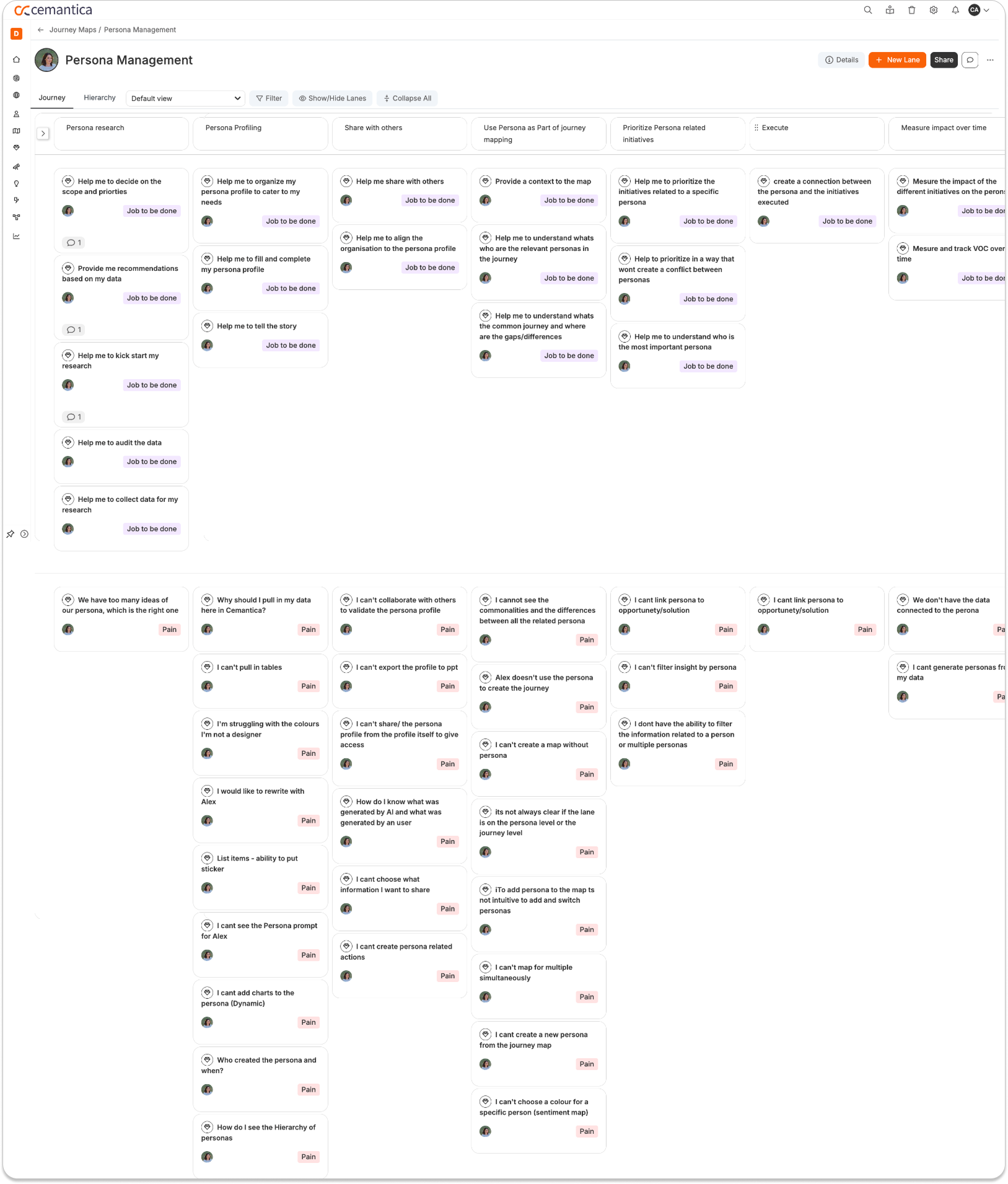
Together with the Product, Sales, and Customer Success teams, we mapped the complete Persona Management journey, identifying user goals, pain points, and Jobs to Be Done.
The workshop uncovered opportunities across the entire feature. For this redesign, we intentionally focused on improving the existing profile experience rather than introducing new functionality.
-
04
Design partners
Design partner validation
Before development, we validated the redesigned experience with a small group of design partner customers in a workshop facilitated by the Product Manager, a CX Consultant, and me.
The workshop included two parts:
- Best practices for creating effective persona profiles.
- Presenting the redesigned experience and collecting customer feedback before development.
Customers described the redesigned profile as cleaner, simpler, and easier to understand, giving the team confidence to move forward with development.

Three core tensions shaping the redesign
Personas were primarily documentation
Customers relied on personas to document customer research, often using long-form content that became difficult to scan within the existing layout.
Improve hierarchy, spacing, and content organization while keeping the experience flexible.
Sales needed a stronger presentation experience
Sales wanted persona profiles that looked polished and visually engaging during product demonstrations.
Improve the visual presentation without compromising the documentation experience.
Existing layouts were too rigid
Teams wanted more flexibility to organize information and present supporting images.
Create a cleaner and more adaptable layout with improved image presentation.
Looking beyond this redesign
The research also uncovered opportunities such as predefined profile templates, AI-assisted creation, collaboration, reusable persona libraries, and stronger connections between personas and journey maps. These ideas became part of the long-term product roadmap but were intentionally kept outside the scope of this project.
Learning from flexible document experiences
I reviewed customer-journey tools such as TheyDo and JourneyTrack, along with persona templates in Notion and the flexible document experience in monday.com.
The exploration helped define three design directions:
-
1
A clearer visual hierarchy for presenting persona information.
-
2
Flexible content blocks that support different profile structures.
-
3
Better treatment of long text and supporting images.
Persona structure


Journey connection

Flexible content blocks


Editable document experience

From a complex form to a simpler editing experience
The existing persona editor relied on a structured three-column layout and predefined input types. While this provided consistency, it also made the experience feel rigid and cognitively demanding, especially when creating detailed persona profiles.
The redesign focused on simplifying the editing experience without changing the underlying functionality.
Three principles guided the redesign:
-
1
Reduce cognitive load
Replace the complex multi-column form with a clean, linear editing experience that feels more natural and easier to scan.
In the UI: Linear document-style layout -
2
Let content drive the structure
Instead of forcing users to choose input types for every field, allow them to build the profile by adding simple content blocks, similar to editing a document.
In the UI: Simple content blocks -
3
Simplify profile editing
Demographic information was redesigned using straightforward label-and-value text inputs, removing unnecessary configuration while preserving flexibility.
In the UI: Simplified demographic fields

A document-like editing experience for persona profiles
The redesign transformed the persona editor from a structured form into a simpler, document-like editing experience. Instead of navigating a three-column layout and configuring different field types, users can now build a persona by adding flexible content sections, similar to working in Notion.
This approach reduces cognitive load while making the profile easier to create, edit, and maintain. To further simplify the experience, demographic information was redesigned using straightforward text inputs for labels and values, eliminating the need to configure individual input types while still supporting different customer needs.

The result is a cleaner editing experience that feels familiar, flexible, and better suited for both documenting customer research and presenting personas to stakeholders.
Cleaner profiles, stronger demos, clearer roadmap
Shipped to productionThe redesigned Persona Management experience was successfully delivered to production as an improvement to an existing feature.
Cleaner profiles
The redesign created a cleaner and more flexible profile experience while preserving the familiar workflow customers already relied on.
Stronger demos
The redesign also addressed one of the Sales team's main concerns by making personas more visually engaging for product demonstrations.
Clearer roadmap
The broader discovery work identified additional opportunities, including predefined templates for different use cases, AI-assisted creation, persona libraries, and deeper journey integration, which continue to guide the long-term roadmap.
What I'm most proud of
Balancing the different needs of customers and internal stakeholders.
Improving an existing experience without adding unnecessary complexity.
Using research and validation to define a focused scope while establishing a clear vision for future evolution.
More case studies
Cemantica Insights
Modernizing an acquired product while preserving a familiar experience.
View case study →
KPI Tracking Feature
A scalable KPI system that helps teams connect business metrics, NPS, satisfaction scores, and financial impact directly to the journey stages.
View case study →